

Redis is a fast, in-memory, NoSQL data store that provides sub-millisecond latency. It's often used as a cache to offload primary database systems, but it's also suitable for chat applications, message queues, and real-time analytics.
With Stacktape, you can deploy a fully managed Redis cluster without worrying about capacity scaling, hardware provisioning, cluster setup, patching, or backups. The service is compatible with open-source Redis, so you can use your existing Redis clients.
Under the hood, Stacktape uses Amazon ElastiCache for Redis.
When to use it
Redis is an excellent choice when performance is critical.
Advantages
- Performance: As an in-memory data store, Redis can deliver sub-millisecond response times, making it an order of magnitude faster than disk-based databases.
- Fully managed: Stacktape handles all the operational overhead, including scaling, provisioning, patching, and backups.
- High availability: Supports both clustered and non-clustered modes and provides automatic failover with minimal impact.
Disadvantages
- Data persistence: While Redis offers persistence options like snapshotting and append-only files, it's not as durable as a transactional database with full logging and point-in-time recovery.
- Memory limitations: All of your data must fit in memory.
- Client complexity: Clients connecting to a Redis cluster need to be aware of the cluster's topology, which can require additional configuration.
Basic usage
This example shows a simple, single-node Redis cluster. The only required properties are instanceSize and defaultUserPassword.
A Lambda function connected to a single-node Redis cluster.
Example code for storing and retrieving data from the cluster.
Instance size
Quick guide:
cache.t4g.micro(~$0.016/hr, 0.5 GB): Development, testing, low-traffic apps.cache.t4g.small(~$0.032/hr, 1.37 GB): Small production apps, session stores.cache.m7g.large(~$0.15/hr, 6.38 GB): Production workloads with moderate data.cache.r7g.large(~$0.20/hr, 13.07 GB): Large datasets, memory-heavy caching.
Families: t = burstable (cheap, variable). m = general purpose. r = memory-optimized.
Suffix g = ARM/Graviton (better price-performance).
This size applies to every node (primary + replicas). You can change it later without data loss.
Default user password
All traffic is encrypted in transit. Use $Secret() instead of hardcoding:
defaultUserPassword: $Secret('redis.password')
Cluster topology
The topology of your cluster, determined by the number of replica nodes and shards, affects its performance and availability.
Single-node cluster
A single-node cluster has only one node and is not highly available.
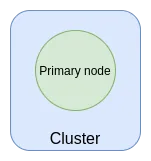
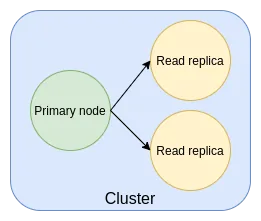
Multi-node cluster
You can add replica nodes to a non-sharded cluster to improve read performance and availability.
If the primary fails and enableAutomaticFailover is on, a replica takes over.
Can't be changed after creation for sharded clusters.
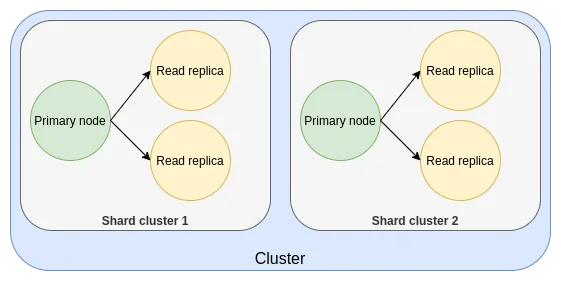
Sharded cluster
For horizontally scaled performance, you can enable sharding to distribute data across multiple primary nodes.
Each shard has its own primary + replicas. Routing is automatic.
Must be set at creation time — can't be added later.
Requires numReplicaNodes >= 1. Replica count can't be changed after creation.
Using a sharded cluster from a Lambda function.
Logging
You can enable logging to send the Redis slow log to a CloudWatch log group.
RedisLoggingAPI referenceParent:RedisClusterdisabled
Disable slow query logging.
Type: boolean
formatDefault: json
Log format.
Type: string ENUM
Possible values: jsontext
retentionDaysDefault: 90
How many days to keep logs.
Type: number ENUM
Possible values: 13571430609012015018036540054573118273653
logForwarding
Forward logs to an external service (Datadog, Highlight.io, or any HTTP endpoint).
Type: HttpEndpointLogForwarding or HighlightLogForwarding or DatadogLogForwarding
Uses Kinesis Data Firehose (~$0.03/GB). Failed deliveries go to a backup S3 bucket.
Forwarding logs
You can forward logs to third-party services. See Forwarding Logs for more information.
Accessibility
You can configure which resources can access your cluster. Redis clusters don't support public IP addresses, so only two access modes are available.
RedisAccessibilityAPI referenceParent:RedisClusteraccessibilityModeDefault: vpcRequired
Who can connect to this cluster.
Type: string ENUM
Possible values: scoping-workloads-in-vpcvpc
vpc(default): Any resource in the same VPC (functions withjoinDefaultVpc: true, containers, batch jobs).scoping-workloads-in-vpc: Only resources that list this cluster in theirconnectTo.
Redis clusters don't have public IPs — you can't connect from your local machine directly. Use a bastion host for local access.
VPC mode
The cluster is only accessible from resources within the default VPC. This includes any function, batch job, or container workload in your stack.
Scoped VPC mode
This mode is more restrictive. In addition to being in the same VPC, a resource must explicitly list the cluster in its connectTo property to gain access.
Referenceable parameters
The following parameters can be easily referenced using $ResourceParam directive directive.
To learn more about referencing parameters, refer to referencing parameters.
In case of NON-sharded cluster(default), this is a hostname of the primary instance that can be used for both reads and writes. In case of sharded cluster, this is cluster's configuration endpoint that can be used for all operations.
- Usage:
$ResourceParam('<<resource-name>>', 'host')
Hostname (address) that can be used for reads only. (only available for NON-sharded clusters). If you use multiple replicas, it is advised to use readerHost for read operations to offload the primary host. ReaderHost automatically balances requests between available read replicas.
- Usage:
$ResourceParam('<<resource-name>>', 'readerHost')
Port of the cluster.
- Usage:
$ResourceParam('<<resource-name>>', 'port')
Indicates whether cluster is sharded. Available values:
enabledordisabled.- Usage:
$ResourceParam('<<resource-name>>', 'sharding')
Pricing
You are charged for:
- Nodes: The price depends on the instance size, number of shards, and number of replica nodes.
- Formula:
num_shards * (num_replica_nodes + 1) * price_per_node - Example 1 (cheapest): A single-node
cache.t3.microcluster costs $0.017/hour (~$12.50/month). - Example 2 (sharded): A two-shard
cache.t3.microcluster with one replica per shard costs $0.068/hour (~$49/month).
- Formula:
- Data transfer: Usually no additional cost.
- Backups: Free for the first day of retention, then $0.085/GB per month.
Free Tier (first 12 months)
- 750 hours of
t2.microort3.microinstances per month.
To learn more, see the AWS pricing page.
API Reference
RedisClusterAPI referencetypeRequired
Type: string "redis-cluster"
properties.instanceSizeRequired
The size of each Redis node. Affects memory, performance, and cost.
Type: string ENUM
Possible values: cache.m4.10xlargecache.m4.2xlargecache.m4.4xlargecache.m4.largecache.m4.xlargecache.m5.12xlargecache.m5.24xlargecache.m5.2xlargecache.m5.4xlargecache.m5.largecache.m5.xlargecache.m6g.12xlargecache.m6g.16xlargecache.m6g.2xlargecache.m6g.4xlargecache.m6g.8xlargecache.m6g.largecache.m6g.xlargecache.m7g.12xlargecache.m7g.16xlargecache.m7g.2xlargecache.m7g.4xlargecache.m7g.8xlargecache.m7g.largecache.m7g.xlargecache.r4.16xlargecache.r4.2xlargecache.r4.4xlargecache.r4.8xlargecache.r4.largecache.r4.xlargecache.r5.12xlargecache.r5.24xlargecache.r5.2xlargecache.r5.4xlargecache.r5.largecache.r5.xlargecache.r6g.12xlargecache.r6g.16xlargecache.r6g.2xlargecache.r6g.4xlargecache.r6g.8xlargecache.r6g.largecache.r6g.xlargecache.r7g.12xlargecache.r7g.16xlargecache.r7g.2xlargecache.r7g.4xlargecache.r7g.8xlargecache.r7g.largecache.r7g.xlargecache.t2.mediumcache.t2.microcache.t2.smallcache.t3.mediumcache.t3.microcache.t3.smallcache.t4g.mediumcache.t4g.microcache.t4g.small
Quick guide:
cache.t4g.micro(~$0.016/hr, 0.5 GB): Development, testing, low-traffic apps.cache.t4g.small(~$0.032/hr, 1.37 GB): Small production apps, session stores.cache.m7g.large(~$0.15/hr, 6.38 GB): Production workloads with moderate data.cache.r7g.large(~$0.20/hr, 13.07 GB): Large datasets, memory-heavy caching.
Families: t = burstable (cheap, variable). m = general purpose. r = memory-optimized.
Suffix g = ARM/Graviton (better price-performance).
This size applies to every node (primary + replicas). You can change it later without data loss.
properties.defaultUserPasswordRequired
Cluster password. 16-128 chars, printable ASCII only. Cannot contain /, ", or @.
Type: string
All traffic is encrypted in transit. Use $Secret() instead of hardcoding:
defaultUserPassword: $Secret('redis.password')
properties.enableSharding
Split data across multiple shards for horizontal scaling.
Type: boolean
Each shard has its own primary + replicas. Routing is automatic.
Must be set at creation time — can't be added later.
Requires numReplicaNodes >= 1. Replica count can't be changed after creation.
properties.numShardsDefault: 1
Number of shards (only with enableSharding: true).
Type: number
properties.numReplicaNodes
Read replicas per shard. Increases read throughput and availability.
Type: number
If the primary fails and enableAutomaticFailover is on, a replica takes over.
Can't be changed after creation for sharded clusters.
properties.enableAutomaticFailover
Auto-promote a replica to primary if the primary node fails.
Type: boolean
Requires numReplicaNodes >= 1. Always enabled for sharded clusters.
Deploy replicas first, then enable failover in a separate deployment.
properties.logging
Slow query logging. Sent to CloudWatch; view with stacktape logs.
Type: RedisLogging
properties.automatedBackupRetentionDays
Days to keep automated daily backups. Set to 0 to disable.
Type: number
properties.portDefault: 6379
Port the cluster listens on.
Type: number
properties.accessibility
Network access control: vpc (default) or scoping-workloads-in-vpc (most restrictive).
Type: RedisAccessibility
properties.engineVersionDefault: 6.2
Redis engine version.
Type: string ENUM
Possible values: 6.06.27.07.1
properties.dev
Dev mode: runs locally in Docker by default. Set remote: true to use the deployed cluster.
Type: DevModeConfig
overrides
Escape hatch to modify the underlying CloudFormation resources Stacktape creates.
Type: Object
Use dot-notation paths to override specific properties on any child resource.
Find resource logical IDs with stacktape stack-info --detailed.
overrides:
  MyDbInstance:
    Properties.StorageEncrypted: true