

A bastion server, or jump host, is a virtual machine that provides secure access to resources that are isolated within a private network (VPC). This is useful for managing resources like databases or Redis clusters that don't have a public endpoint.
Connections to the bastion server are established using SSM Session Manager, which leverages your IAM permissions for authentication. This eliminates the need to expose any ports, providing a highly secure way to access your private resources.
Basic usage
Example of a bastion server configuration.
Connecting to a bastion server
You can start an interactive shell session on a bastion server using the bastion:session command:
Creating a bastion tunnel
For resources that don't have a public endpoint, like a database, you can use a bastion tunnel to access them from your local machine. The bastion:tunnel command creates a secure pathway from a port on your local machine to the port of the target resource, using the bastion server as an intermediary.
Once the tunnel is established, Stacktape will print the local endpoint that you can use to connect to the resource.
Tunnel example
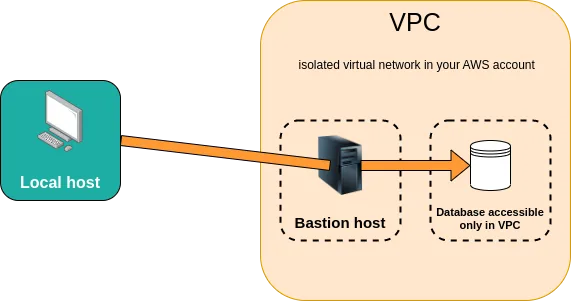
A bastion server with a database that is only accessible within the VPC.
To create a tunnel to the database, you would run:

Bastion tunneling is supported for the following resource types:
relational-databaseredis-clusterapplication-load-balancerprivate-service(when using an application load balancer)
Using a bastion with scripts
You can also use bastion servers with scripts. For more information, see the documentation on bastion scripts and local scripts with bastion tunneling.
A Stacktape configuration that uses a bastion tunnel for a migration script.
Instance size
By default, bastion servers use a t3.micro instance, which is eligible for the AWS Free Tier. You can specify a different instance size using the instanceSize property. For a full list of available instance types, see the AWS documentation.
Custom commands on launch
You can run a custom set of commands when the bastion server is launched using the runCommandsAtLaunch property. This is useful for installing dependencies or performing other setup tasks.
Use to install CLI tools, database clients, or other dependencies. Warning: changing this list after creation replaces the instance — any data on the old instance is lost.
All bastion hosts use the latest Amazon Linux 2023 operating system.
SSM sessions
Stacktape uses SSM Session Manager to provide secure access to bastion servers. This eliminates the need to manage SSH keys or open additional network ports, making it more secure than traditional SSH access.
Pricing
The price of a bastion server depends on its instance size. The default t3.micro instance is free for the first 12 months as part of the AWS Free Tier. After that, it costs approximately $7.50 per month.
API reference
BastionAPI referencetypeRequired
Type: string "bastion"
properties.instanceSizeDefault: t3.micro
EC2 instance type. t3.micro is sufficient for SSH tunneling and basic admin tasks.
Type: string
properties.runCommandsAtLaunch
Shell commands to run when the instance starts (as root — no sudo needed).
Type: Array of string
Use to install CLI tools, database clients, or other dependencies. Warning: changing this list after creation replaces the instance — any data on the old instance is lost.
properties.logging
Log retention settings for system, security, and audit logs. Logs are sent to CloudWatch.
Type: BastionLoggingConfig
overrides
Escape hatch to modify the underlying CloudFormation resources Stacktape creates.
Type: Object
Use dot-notation paths to override specific properties on any child resource.
Find resource logical IDs with stacktape stack-info --detailed.
overrides:
  MyDbInstance:
    Properties.StorageEncrypted: true
BastionLoggingConfigAPI referenceParent:BastionmessagesDefault: retentionDays: 30
System messages (/var/log/messages) — startup info, kernel messages, service logs.
Type: BastionLogging
secureDefault: retentionDays: 180
Auth logs (/var/log/secure) — SSH login attempts, authentication events.
Type: BastionLogging
auditDefault: retentionDays: 365
Audit logs (/var/log/audit/audit.log) — detailed security events from the Linux audit system.
Type: BastionLogging
BastionLoggingAPI referenceParent:BastionLoggingConfigdisabled
Disable this log type. Stops sending to CloudWatch.
Type: boolean
retentionDays
Days to keep logs in CloudWatch before automatic deletion.
Type: number ENUM
Possible values: 13571430609012015018036540054573118273653
logForwarding
Forward logs to an external service (Datadog, Highlight.io, or any HTTP endpoint).
Type: HttpEndpointLogForwarding or HighlightLogForwarding or DatadogLogForwarding
Uses Kinesis Data Firehose (~$0.03/GB). Failed deliveries go to a backup S3 bucket.