

A Content Delivery Network (CDN) is a geographically distributed network of servers that work together to provide fast delivery of internet content. By caching content in locations closer to your users, a CDN can significantly reduce latency and decrease the load on your application's origin servers. It can also improve security by providing a layer of defense against DDoS attacks.
Under the hood, Stacktape uses Amazon CloudFront, which has over 300 points of presence (PoPs) worldwide.
How a CDN works
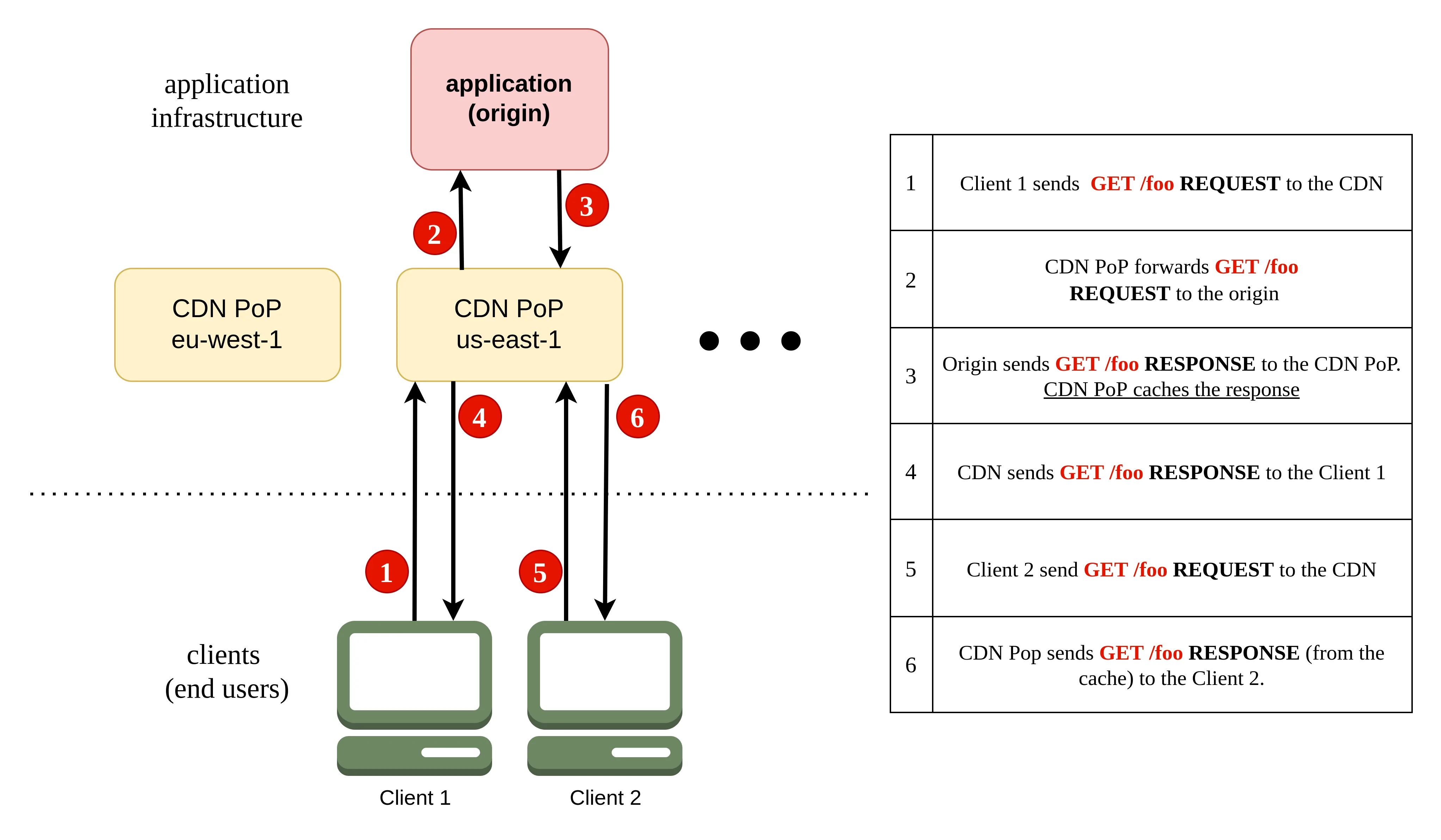
A CDN acts as a layer between your application (the origin) and your clients.
- Instead of sending requests directly to your application, clients send them to the CDN.
- The CDN routes the request to the nearest PoP.
- The PoP retrieves the response from your application (the origin).
- The PoP sends the response to the client and caches it for future requests.
- Subsequent requests for the same content can be served directly from the cache (a cache hit), which is much faster.
You can control which responses are cached and for how long. See the section on cache control for more information.
Basic usage
In Stacktape, you configure a CDN on a resource, which then becomes the default origin for the CDN. You can use a CDN with a bucket, HTTP API Gateway, or Application Load Balancer.
You can also configure route rewrites to forward requests for specific paths to different origins. This allows you to create hybrid infrastructures where, for example, static content is served from a bucket and dynamic content is served from an API.
CdnConfigurationAPI referenceenabledRequired
Enable CDN (CloudFront) for faster global delivery and lower bandwidth costs.
Type: boolean
Caches responses at edge locations worldwide so users get content from the nearest server. The CDN itself has no monthly fee — you pay per request (~$0.01/10k) and per GB transferred.
cachingOptions
Control how long and what gets cached at the CDN edge.
Type: CdnCachingOptions
When the origin response has no Cache-Control header, defaults apply:
- Bucket origins: cached for 6 months (or until invalidated on deploy).
- API Gateway / Load Balancer origins: not cached.
forwardingOptions
Control which headers, cookies, and query params are forwarded to your origin.
Type: CdnForwardingOptions
By default, all headers/cookies/query params are forwarded. Use this to restrict what reaches your app (e.g., strip cookies for static content).
routeRewrites
Route specific URL patterns to different origins (e.g., /api/* → Lambda, /assets/* → S3).
Type: Array of CdnRouteRewrite
Evaluated in order; first match wins. Unmatched requests go to the default origin. Each route can have its own caching and forwarding settings.
customDomains
Custom domains (e.g., cdn.example.com). Stacktape auto-creates DNS records and TLS certificates.
Type: Array of DomainConfiguration
Your domain must be added as a Route53 hosted zone in your AWS account first.
edgeFunctions
Run edge functions on CDN requests/responses (URL rewrites, auth, A/B testing).
Type: EdgeFunctionsConfig
onRequest: Before cache lookup — modify the request, add auth, or return early.onResponse: Before returning to the client — modify headers, add cookies.
cloudfrontPriceClassDefault: PriceClass_All
Which regions the CDN serves from. Fewer regions = lower cost, but slower for distant users.
Type: string ENUM
Possible values: PriceClass_100PriceClass_200PriceClass_All
PriceClass_100: North America + Europe. Cheapest option. Good if your users are in the US/EU.PriceClass_200: Adds Asia, Middle East, Africa.PriceClass_All(default): All regions worldwide, including South America and Oceania.
The CDN itself has no monthly base cost - you only pay per request and per GB transferred. The price class controls which edge locations are used, and some regions cost more per request.
defaultRoutePrefix
Prepend a path prefix to all requests forwarded to the origin.
Type: string
E.g., with prefix /v2, a request for /users is forwarded to the origin as /v2/users.
errorDocumentDefault: /404.html
Page to show for 404 errors (e.g., /error.html).
Type: string
indexDocumentDefault: /index.html
Page served for requests to /.
Type: string
disableInvalidationAfterDeploy
Skip clearing the CDN cache after each deploy.
Type: boolean
By default, all cached content is flushed on every deploy so users see the latest version.
Set to true if you manage cache invalidation yourself or want to keep cached content between deploys.
useFirewall
Name of a web-app-firewall resource to protect this CDN from common web exploits.
Type: string
CDN with a bucket
You can enable a CDN for a bucket with just two lines of configuration. By default, content from the bucket is cached for six months. This is a common pattern for serving static websites.
CDN with an HTTP API Gateway
You can also enable a CDN for an HTTP API Gateway. By default, the CDN does not cache any content from an API gateway, as it's assumed to be dynamic. You can control the caching behavior by setting the Cache-Control header in your API's responses.
CDN with an Application Load Balancer
Similarly, you can enable a CDN for an Application Load Balancer. As with an API gateway, content is not cached by default.
Custom domain names
Your domain must be added as a Route53 hosted zone in your AWS account first.
DomainConfigurationAPI referenceParent:CdnConfigurationdomainNameRequired
Your domain name (e.g., mydomain.com or api.mydomain.com).
Type: string
Don't include the protocol (https://). The domain must have a Route53 hosted zone
in your AWS account, with your registrar's nameservers pointing to it.
Stacktape automatically creates a DNS record and provisions a free TLS certificate.
customCertificateArn
Use your own TLS certificate instead of the auto-generated one.
Type: string
Provide the ARN of an ACM certificate from your AWS account. Only needed if you have specific certificate requirements (e.g., EV/OV certs). By default, Stacktape provisions and renews free certificates automatically.
disableDnsRecordCreation
Skip DNS record creation for this domain.
Type: boolean
Set to true if you manage DNS records yourself (e.g., through Cloudflare or another DNS provider).
Stacktape will still provision the TLS certificate but won't touch your DNS.
Edge Lambda functions
You can run Lambda functions at the edge to customize the content that the CDN delivers. For more information, see the Edge Lambda Functions page.
onRequest: Before cache lookup — modify the request, add auth, or return early.onResponse: Before returning to the client — modify headers, add cookies.
EdgeFunctionsConfigAPI referenceParent:CdnConfiguration or CdnRouteRewriteonRequest
Name of an edge-lambda-function to run when the CDN receives a request (before cache lookup).
Type: string
Use to modify the request, add auth checks, or return an immediate response without hitting the origin.
onResponse
Name of an edge-lambda-function to run before returning the response to the client.
Type: string
Use to modify response headers, add security headers, or set cookies.
Does not run if the origin returned a 400+ error or if onRequest already generated a response.
onOriginRequest
Name of an edge-lambda-function to run before forwarding to the origin (after cache miss).
Type: string
Only runs on cache misses. Use to modify the request before it reaches your origin.
Warning: Stacktape uses this trigger internally for bucket/web-service/API Gateway CDN setups. Overriding it may break default behavior. Only use if you know what you're doing.
onOriginResponse
Name of an edge-lambda-function to run after the origin responds (before caching).
Type: string
Modify the response before it's cached and returned. Changes are cached as if they came from the origin.
Cache control
You can control the caching behavior of the CDN in two ways:
- Using the
Cache-Controlheader (recommended): This gives you fine-grained control over the caching behavior for each response from your origin. - Using CDN caching options: This allows you to set basic caching rules but is less flexible.
Stacktape automatically invalidates the entire CDN cache after each successful deployment. This ensures that your users always receive the latest version of your content. You can disable this behavior in the automatic invalidation settings.
Cache-Control header with buckets
You can set the Cache-Control header for objects in a bucket using metadata. When you use the directory upload feature, Stacktape can automatically set the correct headers for you using presets.
Cache-Control header with an HTTP API Gateway or Application Load Balancer
When using a CDN with an API gateway or an ALB, you can set the Cache-Control header in the responses from your application.
A Lambda function that returns a response with a
Cache-Controlheader.
For more information on the Cache-Control header, see the MDN docs.
CDN caching options
You can specify default caching behavior for your CDN. Different caching options can be set for each route rewrite.
If you don't specify any caching options, Stacktape uses the following defaults:
| Origin type | minTTL | maxTTL | defaultTTL |
|---|---|---|---|
| Bucket | 0 | 31536000 | 15768000 |
| HTTP API Gateway | 0 | 31536000 | 0 |
| Application Load Balancer | 0 | 31536000 | 0 |
CdnCachingOptionsAPI referenceParent:CdnConfiguration or CdnRouteRewritecacheMethods
HTTP methods to cache. Use ['GET', 'HEAD', 'OPTIONS'] if your API uses CORS preflight.
Type: Array of string ENUM
Possible values: GETHEADOPTIONS
minTTL
Minimum cache time (seconds). Overrides Cache-Control: max-age if the origin sets a lower value.
Type: number
maxTTL
Maximum cache time (seconds). Caps how long the CDN caches content, even if the origin says longer.
Type: number
defaultTTL
Default cache time (seconds). Used when the origin response has no Cache-Control or Expires header.
Type: number
disableCompression
Disable automatic Gzip/Brotli compression. Compression is on by default and reduces transfer size/cost.
Type: boolean
cacheKeyParameters
Which headers, cookies, and query params make responses unique in the cache.
Type: CdnCacheKey
Defaults: Bucket = URL path only. API/ALB = URL path + query string. Values included in the cache key are always forwarded to the origin.
cachePolicyId
Use a pre-existing AWS cache policy ID instead of configuring TTL and cache key options here.
Type: string
Controlling the cache key
The cache key is a unique identifier for each object in the cache. It determines whether a request results in a cache hit. By default, the cache key is based on the URL path, but you can configure it to include headers, cookies, or query parameters.
If you don't specify a cache key, Stacktape uses the following defaults:
| Origin type | Parts of request included in cache key |
|---|---|
| Bucket | URL path |
| HTTP API Gateway | URL path, all query params, and the Authorization header |
| Application Load Balancer | URL path, all query params, and the Authorization header |
For example, if your origin uses the Accept-Language header to return different content based on the client's language, you should include that header in the cache key.
CdnCacheKeyAPI referenceParent:CdnCachingOptionscookies
Which cookies to include in the cache key. Different cookie values = different cached responses.
Type: CacheKeyCookies
headers
Which headers to include in the cache key. Different header values = different cached responses.
Type: CacheKeyHeaders
queryString
Which query params to include in the cache key. Different param values = different cached responses.
Type: CacheKeyQueryString
CDN forwarding options
Forwarding options specify which parts of a request are forwarded to the origin. You can also filter which request methods are forwarded.
If you don't specify any forwarding options, Stacktape uses the following defaults:
| Origin type | Parts of request forwarded to origin |
|---|---|
| Bucket | URL path |
| HTTP API Gateway | URL path, all query params, all headers, and all cookies |
| Application Load Balancer | URL path, all query params, all headers, and all cookies |
CdnForwardingOptionsAPI referenceParent:CdnConfiguration or CdnRouteRewritecustomRequestHeaders
Static headers the CDN adds to every request sent to the origin (e.g., API keys, custom identifiers).
Type: Array of CdnCustomRequestHeader
allowedMethods
HTTP methods forwarded to the origin. Default: all methods.
Type: Array of string ENUM
Possible values: DELETEGETHEADOPTIONSPATCHPOSTPUT
cookies
Which cookies to forward to the origin. Default: all cookies.
Type: ForwardCookies
Cookies in the cache key (see cachingOptions) are always forwarded regardless of this setting.
headers
Which headers to forward to the origin. Default: all headers.
Type: ForwardHeaders
The Authorization header must be added to cachingOptions.cacheKeyParameters to be forwarded.
queryString
Which query params to forward to the origin. Default: all query params.
Type: ForwardQueryString
originRequestPolicyId
Use a pre-existing AWS origin request policy ID instead of configuring forwarding options here.
Type: string
Route rewrites
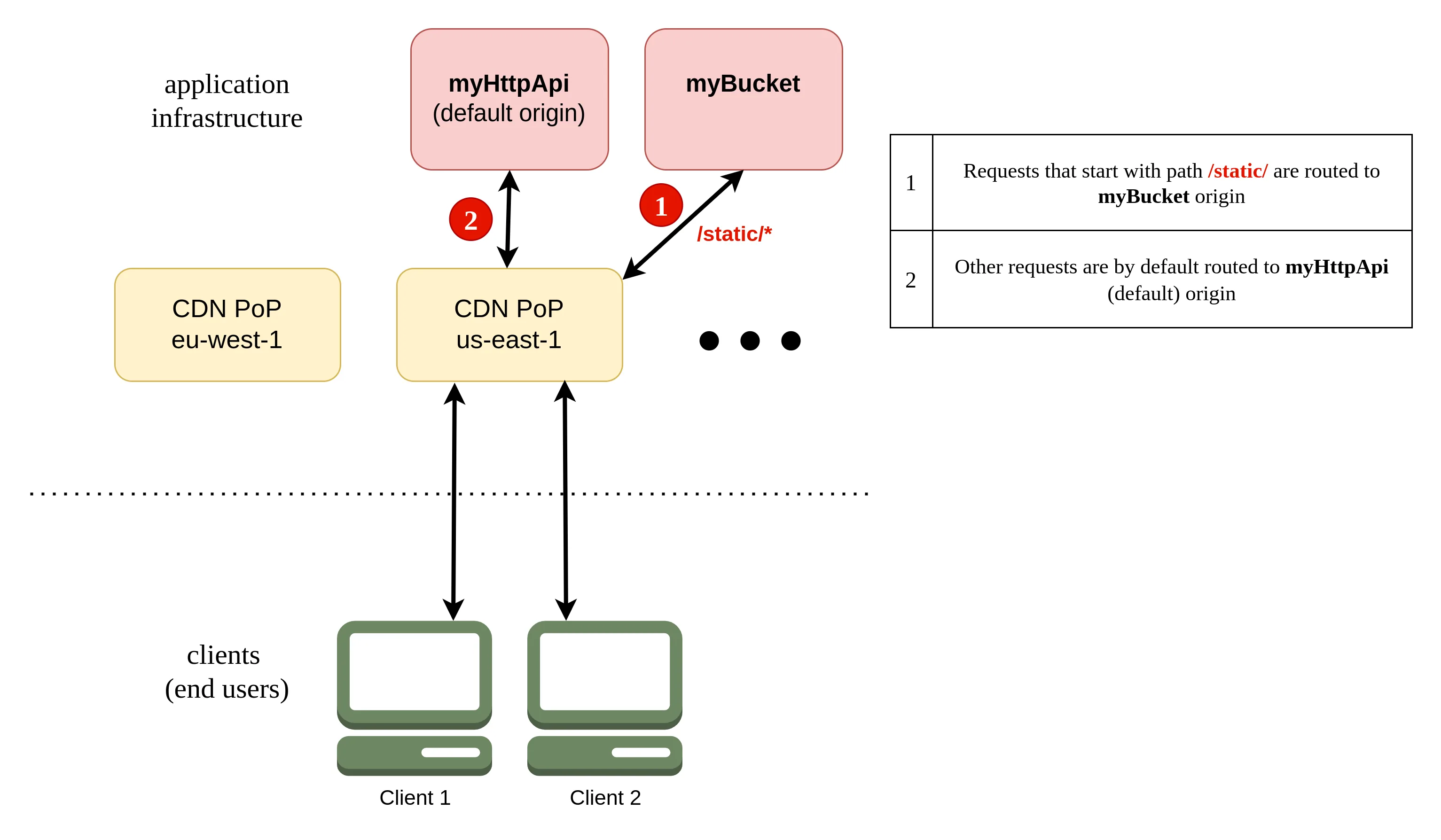
Route rewrites allow you to route incoming requests to different origins based on the URL path.
Evaluated in order; first match wins. Unmatched requests go to the default origin. Each route can have its own caching and forwarding settings.
CdnRouteRewriteAPI referenceParent:CdnConfigurationpathRequired
URL path pattern to match (e.g., /api/*, *.jpg, /docs/v2/*). Wildcards supported.
Type: string
routePrefix
Prepend a path prefix to requests before forwarding to the origin.
Type: string
E.g., with prefix /v2, a request for /users is forwarded as /v2/users.
routeTo
Where to send matching requests. Can be a bucket, API Gateway, load balancer, Lambda, or external domain.
Type: CdnLoadBalancerRoute or CdnHttpApiGatewayRoute or CdnLambdaFunctionRoute or CdnCustomDomainRoute or CdnBucketRoute
If not set, requests go to the default origin (the resource this CDN is attached to).
cachingOptions
Override caching behavior for requests matching this route.
Type: CdnCachingOptions
forwardingOptions
Override which headers, cookies, and query params are forwarded for this route.
Type: CdnForwardingOptions
edgeFunctions
Run edge functions on requests/responses matching this route.
Type: EdgeFunctionsConfig
Routing to a bucket
In this example, requests with a URL path starting with /static are routed to a bucket, while all other requests are routed to an HTTP API Gateway.
CdnBucketRouteAPI referenceParent:CdnRouteRewritetypeRequired
Type: string "bucket"
properties.bucketNameRequired
Name of the bucket resource to route to.
Type: string
properties.disableUrlNormalization
Disable clean URL normalization (e.g., /about → /about.html).
Type: boolean
Routing to an Application Load Balancer
CdnLoadBalancerRouteAPI referenceParent:CdnRouteRewritetypeRequired
Type: string "application-load-balancer"
properties.loadBalancerNameRequired
Name of the application-load-balancer resource to route to.
Type: string
properties.listenerPort
Listener port on the load balancer. Only needed if using custom listeners.
Type: number
properties.originDomainName
Explicit origin domain. Only needed if the ALB has no customDomains and uses customCertificateArns.
Type: string
Routing to an HTTP API Gateway
CdnHttpApiGatewayRouteAPI referenceParent:CdnRouteRewritetypeRequired
Type: string "http-api-gateway"
properties.httpApiGatewayNameRequired
Name of the http-api-gateway resource to route to.
Type: string
Routing to a custom origin
CdnCustomDomainRouteAPI referenceParent:CdnRouteRewritetypeRequired
Type: string "custom-origin"
properties.domainNameRequired
Domain name of the external origin (e.g., api.example.com).
Type: string
properties.protocolDefault: HTTPS
Protocol for connecting to the origin.
Type: string ENUM
Possible values: HTTPHTTPS
properties.port
Port on the origin. Defaults to 443 for HTTPS, 80 for HTTP.
Type: number
Automatic invalidation
You can disable the automatic cache invalidation that occurs after each deployment by setting invalidateAfterDeploy to false.
Price class
You can set a price class to reduce the cost of your CDN by limiting the number of edge locations from which it serves traffic.
PriceClass_100: North America + Europe. Cheapest option. Good if your users are in the US/EU.PriceClass_200: Adds Asia, Middle East, Africa.PriceClass_All(default): All regions worldwide, including South America and Oceania.
The CDN itself has no monthly base cost - you only pay per request and per GB transferred. The price class controls which edge locations are used, and some regions cost more per request.
Firewall
You can protect your CDN with a web application firewall.
Name of a web-app-firewall resource to protect this CDN from common web exploits.
To learn more, see the Web Application Firewall documentation.
API reference
CacheKeyHeadersAPI referenceParent:CdnCacheKeynone
No headers are included in the cache key.
Type: boolean
whitelist
Only the listed headers are included in the cache key.
Type: Array of string
CacheKeyQueryStringAPI referenceParent:CdnCacheKeyall
All query parameters are included in the cache key.
Type: boolean
none
No query parameters are included in the cache key.
Type: boolean
whitelist
Only the listed query parameters are included in the cache key.
Type: Array of string
CdnCustomRequestHeaderAPI referenceParent:CdnForwardingOptionsheaderNameRequired
Name of the header
Type: string
valueRequired
Value of the header
Type: string
ForwardHeadersAPI referenceParent:CdnForwardingOptionsnone
No headers are forwarded to the origin.
Type: boolean
whitelist
Only the listed headers are forwarded to the origin.
Type: Array of string
allViewer
Forward all headers from the viewer's request.
Type: boolean
allViewerAndWhitelistCloudFront
Forward all viewer headers plus the listed CloudFront-specific headers (e.g., CloudFront-Viewer-Country).
Type: Array of string
allExcept
Forward all viewer headers except the listed ones.
Type: Array of string
ForwardQueryStringAPI referenceParent:CdnForwardingOptionsall
All query parameters are forwarded to the origin.
Type: boolean
none
No query parameters are forwarded to the origin.
Type: boolean
whitelist
Only the listed query parameters are forwarded to the origin.
Type: Array of string