

Stacktape secrets are sensitive values — API keys, database passwords, tokens — stored in AWS Secrets Manager and
referenced in your stacktape.ts using the $Secret() directive. When you use
$Secret(), your Stacktape config contains only the directive reference, so you do not need to commit the actual
secret value.
At deploy time, Stacktape resolves each reference into a CloudFormation dynamic reference that AWS resolves when
creating or updating resources.
Why use secrets
Hard-coding credentials in configuration files is a security risk. Even private repositories can leak through CI logs,
screenshots, or developer machines. The $Secret() directive references values stored in AWS Secrets Manager — an
encrypted, audited, access-controlled store. At deploy time, Stacktape resolves each $Secret() into a CloudFormation
dynamic reference; in dev mode, it calls AWS Secrets Manager directly.
Common values that belong in secrets:
- Database passwords
- Third-party API keys (Stripe, Twilio, SendGrid)
- OAuth client secrets
- Bot tokens (Discord, Slack)
- Encryption keys and signing secrets
When NOT to use secrets
Not everything needs to be a secret. Keep non-sensitive configuration directly in your stacktape.ts or use
variables:
- Public API URLs or endpoint addresses
- Feature flags and numeric thresholds
- Region names, stage identifiers, or app names
- Any value you would be comfortable seeing in a git log
AWS Secrets Manager has a per-secret monthly storage cost and per-API-call charges — avoid using it for non-sensitive values where a hard-coded config value would work without added cost or complexity.
Creating secrets
You can create secrets from the Stacktape Console or the CLI. The Console Secrets page works per AWS account and AWS region — the list request passes the selected region to AWS Secrets Manager.
Using the Stacktape Console
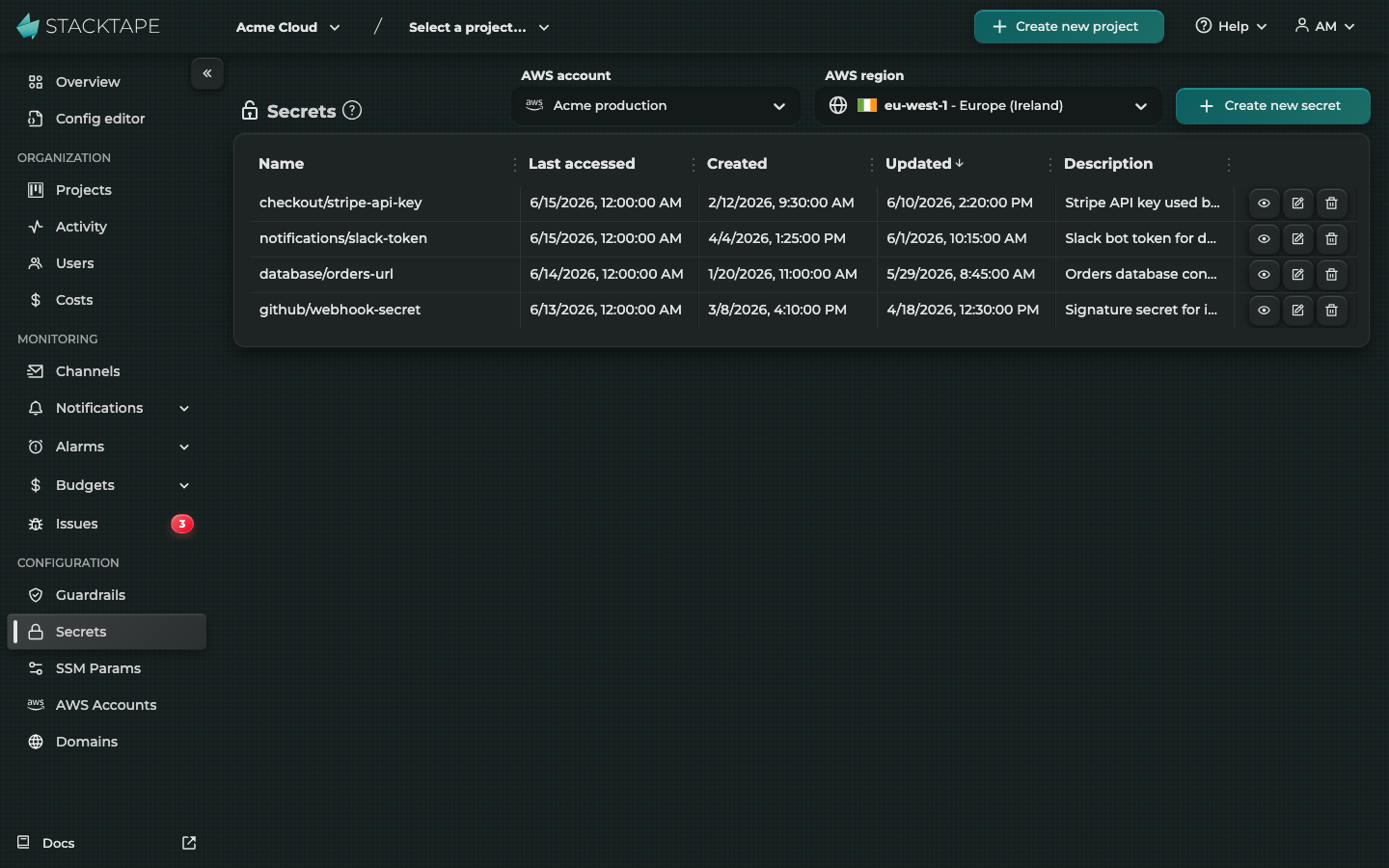
The Secrets page in the Stacktape Console lets you create, view, edit, and delete secrets. Select an AWS account and region, then click Create new secret to open the creation modal.
The page lists secrets with their name, last accessed date, created date, updated date, and description. Sorting is available on all columns, and pagination handles large secret lists. Each secret row provides actions to view its value, edit it, or delete it.
Using the CLI
The CLI also provides a stacktape secret set command for creating secrets from the
terminal. See the secret set CLI reference for supported options.
Referencing secrets with $Secret()
The $Secret() directive references a secret by name. During deployment, Stacktape
fetches the secret from AWS Secrets Manager, records its current version ID, and inserts a CloudFormation dynamic
reference ({{resolve:secretsmanager:...}}) into the template. The actual secret value never appears in the
CloudFormation template — AWS resolves it at resource creation time.
Native secret injection for containers
For web services, private services, worker services, multi-container workloads, and Batch jobs, put sensitive
environment variables in secrets, not environment. Stacktape then gives ECS or AWS Batch the SSM parameter ARN or
Secrets Manager ARN. The container runtime fetches the value immediately before starting the container, so the value
is not stored in the CloudFormation template or task/job definition.
Every valueFrom must be one exact $SsmParam(...) or $Secret(...) directive. SSM parameters used here must be
SecureString. Stacktape grants the container execution role read access only to the referenced parameters and
secrets. If a SecureString uses a customer-managed KMS key, also grant kms:Decrypt for that key with
iamRoleStatements.
Stacktape records the current SSM parameter version as non-sensitive task metadata, so redeploying after a parameter update creates and rolls out a new task definition. Secrets Manager references are pinned to the current version ID. In local dev mode, Stacktape resolves the same directives and supplies the resulting environment variables locally.
Using $Secret() or $SsmParam() under a container's ordinary environment field makes CloudFormation resolve the
value before registering the task definition. Use secrets to keep the value out of the task definition and its
Describe APIs.
$Secret() resolves to a CloudFormation dynamic reference at deploy time. It is commonly used in workload
environment variables and database credential fields — config properties that accept runtime
directives.
Basic usage
Import $Secret from stacktape and use it as a value in your config. This example injects a Discord bot token into
a worker service as an environment variable:
Your application code reads the value from the environment variable — process.env.DISCORD_BOT_TOKEN. The secret
named discord-bot-token must be fetchable by Stacktape before deployment. If it cannot be fetched, the deployment
fails with an error and a hint to create it using stacktape secret set.
JSON secrets
When a secret stores a JSON object, pass the key you need as the second argument: $Secret('secretName', 'keyName').
This is useful for database credentials where a single secret holds multiple related fields. The first argument is the
exact secret name, so a name such as billing.api works too. Stacktape 3 configurations that write
$Secret('secretName.keyName') keep working and read the same secret and key.
In this example, $Secret('mainDatabase', 'password') reads the password key from a JSON secret named mainDatabase.
The secret value in AWS Secrets Manager would look like:
Dot notation requires the secret value to be valid JSON. If the value is not valid JSON, or the selected key does not resolve to a truthy value, the deployment fails with a descriptive error.
How $Secret() resolution works
The $Secret() directive resolves differently at deploy time and when the CLI reads values locally.
At deploy time, Stacktape fetches the secret from AWS Secrets Manager, records the current version ID as a
CloudFormation stack output, and inserts a dynamic reference ({{resolve:secretsmanager:secretName:SecretString:jsonKey::versionId}})
into the template. AWS CloudFormation resolves the actual value when creating or updating the resource. The secret
value never appears in the CloudFormation template itself — only the reference string does.
During local resolution, including dev mode (stacktape dev) and
scripts, $Secret() reads the current value from AWS Secrets Manager (AWSCURRENT), just as $SsmParam() reads the
current parameter value. Updating a secret takes effect the next time the CLI resolves it locally, even if the stack
was deployed with an older version. This applies to both whole secrets and JSON keys.
Commands that connect to deployed databases, such as query-sql and query-redis, use the secret version embedded in
the deployed connection string so their credentials match the database.
Version pinning: Each deployment pins to the secret version that was current at deploy time. If someone updates the secret value between deployments, deployed workloads continue using the pinned version until the next redeployment. This means updating a secret requires a redeploy to take effect in deployed workloads.
Retrieving and managing secrets
Stacktape provides CLI commands and Console actions for reading, updating, and deleting secrets in AWS Secrets Manager. The Secrets page in the Console lists AWS Secrets Manager secrets in the selected AWS account and region.
View a secret value
stacktape secret get --show-secrets prints a secret's current value. Without --show-secrets, it
prints the secret's name, ARN and creation date only. See the secret get CLI reference for supported
options.
In the Stacktape Console, click the view action (eye icon) next to a secret to reveal its value.
Update a secret
In the Console, click the edit action next to a secret to open the update modal.
After updating a secret, redeploy the stack for workloads to pick up the new value. The $Secret() directive pins to
a specific secret version at deploy time, so running workloads continue using the version from the last deployment
until you redeploy.
Delete a secret
The CLI provides stacktape secret delete for removing secrets. See the
secret delete CLI reference for supported options.
In the Console, click the delete action next to a secret.
Do not delete secrets that are referenced by active stacks. The next deployment that references the missing secret
will fail because the dynamic reference cannot resolve. Remove the $Secret() reference from your config and
redeploy before deleting the secret, or delete the stack first.
Secrets vs $SsmParam()
Stacktape provides $Secret() for AWS Secrets Manager and $SsmParam() for AWS Systems Manager Parameter Store. Use
this comparison when deciding where to keep sensitive or externally managed configuration values. $SsmParam() uses
CloudFormation ssm-secure dynamic references for SecureString parameters, or ssm references for standard String
parameters. Both are directives.
| Feature | $Secret() | $SsmParam() |
|---|---|---|
| Backing store | AWS Secrets Manager | AWS SSM Parameter Store |
| JSON key extraction (dot notation) | ✓ | Not implemented |
| Encryption | Always encrypted (KMS) | SecureString type uses KMS |
| CF dynamic reference type | secretsmanager | ssm / ssm-secure |
| Version pinning | Pins to VersionId | Pins to Version number |
Use $Secret() when you need Secrets Manager features such as managed rotation. Use a SecureString $SsmParam() for
credentials that do not rotate and where Parameter Store's lower storage cost is preferable. Standard String
parameters remain useful for non-secret configuration shared across stacks.
Secrets FAQ
Can I share secrets across stages?
Yes. Secrets in AWS Secrets Manager are independent of Stacktape stacks. If you create a secret called stripe-key in
eu-west-1, every stack deployed to that region can reference it with $Secret('stripe-key'). Use naming conventions
like production-stripe-key and staging-stripe-key if you need stage-specific values.
What happens if a referenced secret does not exist?
The deployment fails with an error naming the missing secret and a hint suggesting you create it using
stacktape secret set. Create all referenced secrets in the deployment region before running
stacktape deploy.
Where can I use $Secret() in my config?
$Secret() resolves to a CloudFormation dynamic reference at deploy time, so it works in any config property that
accepts runtime directives. It is most commonly used in workload environment variables and database credential
fields, across Lambda functions,
web services, worker services,
batch jobs, and
multi-container workloads.
How much does AWS Secrets Manager cost?
AWS Secrets Manager charges a per-secret monthly storage fee and a per-API-call fee. A typical Stacktape project with a handful of secrets incurs minimal cost. See the AWS Secrets Manager pricing page for current rates.
Why do my workloads still use the old secret value after I updated it?
$Secret() pins to the secret version that was current at deploy time, so updating the value in AWS Secrets Manager
does not affect running workloads on its own. Redeploy the stack to pin to and roll out the new version.
Can I rotate secrets automatically?
AWS Secrets Manager supports automatic rotation via Lambda functions, but Stacktape does not configure rotation
automatically. You can set up rotation directly in the AWS Console. After rotation, redeploy your stack so workloads
pick up the new secret version — $Secret() pins to the version from the last deployment.