

Next.js Website
The nextjs-website resource is designed to deploy Next.js applications to AWS. It leverages serverless technologies like AWS Lambda and Lambda@Edge to run your application efficiently. Stacktape automatically provisions and configures all the necessary AWS resources, so you can focus on writing your application code.
resources:web:type: nextjs-webproperties:appDirectory: ./
Basic use of nextjs-web resource
How it Works
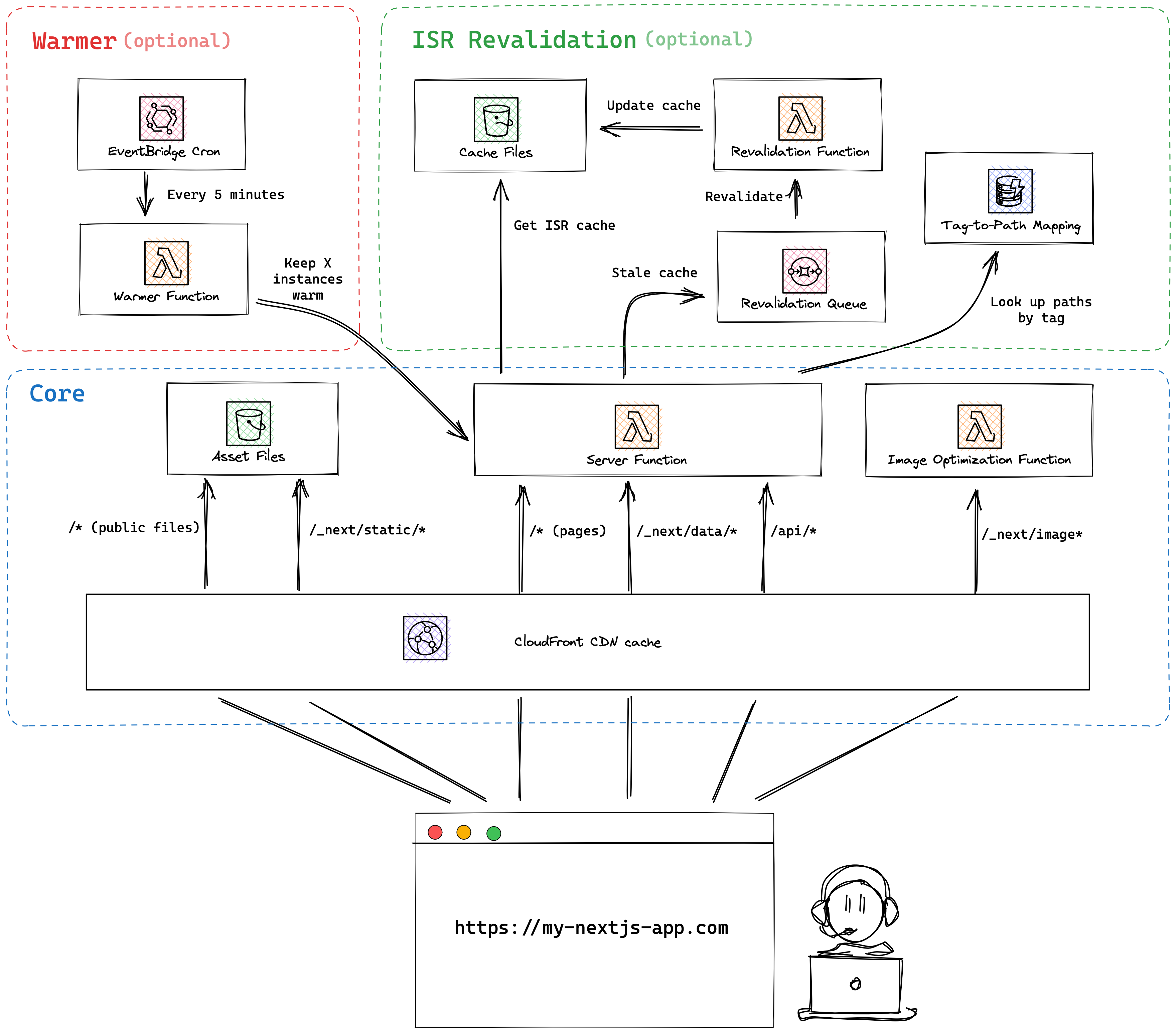
Stacktape uses the open-source project OpenNEXT to build your Next.js application, making it compatible with AWS Lambda. Behind the scenes, Stacktape provisions a set of AWS resources to host your app:
| Component | Type | Description |
|---|---|---|
| Server function | Lambda or Lambda@Edge | Runs your Next.js server logic. |
| Asset Bucket | S3 bucket | Stores static assets (like images, CSS) and cached assets. |
| Image optimization function | Lambda | Handles on-the-fly image optimization for the Next.js <Image> component. |
| CloudFront distribution | CDN | A CDN that caches and distributes your website content globally for low latency. |
| Revalidation function | Lambda | Handles content revalidation when using Incremental Static Regeneration (ISR). |
| Revalidation queue | SQS Queue | A message queue used by the server function to trigger the revalidation function. |
| Revalidation table | DynamoDB table | A NoSQL database that supports Next.js revalidateTag for on-demand revalidation. |
| Revalidation inserter | Lambda | Populates the revalidation table during deployment. |
| Warmer function (Optional) | Lambda | Keeps the server function warm to prevent cold starts (not available for Lambda@Edge). |
For more information refer to OpenNext docs.
Edge Deployments
To deploy your Next.js application to the edge for lower latency, you can use Lambda@Edge by setting the useEdgeLambda property to true. This deploys your server function to CDN locations around the world.
When enabled, your server-side rendering logic will run at AWS edge locations, closer to your users, which can significantly reduce latency.
Trade-offs:
- Slower deployment times compared to a standard regional Lambda.
- The "warming" feature (
warmServerInstances) is not supported.
resources:web:type: nextjs-webproperties:appDirectory: ./useEdgeLambda: true
Performance Optimization
Mitigating Cold Starts
To mitigate cold starts and ensure your server function responds quickly, you can enable a warmer. This keeps a specified number of function instances active. By default, the warmer is disabled. This feature is not available when using useEdgeLambda.
To mitigate cold starts and improve response times, you can keep a specified number of Lambda instances "warm" (pre-initialized). This is done by a separate "warmer" function that periodically invokes the server-side function.
Note: This feature is not available when using Lambda@Edge (useEdgeLambda: true).
resources:web:type: nextjs-webproperties:appDirectory: ./warmServerInstances: 5
Security
Web Application Firewall
You can protect your Next.js application from common web exploits by attaching a web-app-firewall. This can help prevent attacks that could affect your application's availability, compromise security, or consume excessive resources.
resources:web:type: nextjs-webproperties:appDirectory: ./useFirewall: wafwaf:type: web-app-firewallproperties:scope: cdn
Environment variables
You can inject environment variables into the server function. These variables are available at build time and runtime.
A list of environment variables to pass to the script or command.
Values can be:
- A static string, number, or boolean.
- The result of a custom directive.
- A reference to another resource's parameter using the `$ResourceParam` directive.
- A value from a secret using the `$Secret` directive.
resources:web:type: nextjs-webproperties:appDirectory: ./environment:- name: STATIC_ENV_VARvalue: my-env-var- name: DYNAMICALLY_SET_ENV_VARvalue: $MyCustomDirective('input-for-my-directive')- name: DB_HOSTvalue: $ResourceParam('myDatabase', 'host')- name: DB_PASSWORDvalue: $Secret('dbSecret.password')
Custom Domain Names
You can configure custom domains for your Next.js application. Stacktape will automatically provision an SSL certificate and configure DNS routing.
When you connect a custom domain, Stacktape automatically:
- Creates DNS records: A DNS record is created to point your domain name to the resource.
- Adds TLS certificates: If the resource uses HTTPS, Stacktape issues and attaches a free, AWS-managed TLS certificate, handling TLS termination for you.
To manage a custom domain, it first needs to be added to your AWS account. This means that a hosted zone (collection of records managed together for a given domain) for your domain exists in your AWS account and your domain registrar's name servers are pointing to it. To learn more, refer to Adding a domain guide.
resources:web:type: nextjs-webproperties:appDirectory: ./customDomains:- domainName: mydomain.com
Accessing Other Resources
By default, most AWS resources are not allowed to communicate with each other. This is a security measure to ensure resource isolation. To allow your Next.js application to access other resources, you need to grant permissions explicitly.
- IAM Permissions: Access to most AWS services is controlled by IAM (Identity and Access Management). Stacktape automatically manages the necessary permissions for the resources it creates.
- Relational Databases: Relational Databases use their own access control (a connection string with a username and password) and are not managed by IAM. They are accessible by default unless you configure more restrictive access controls.
If your Next.js application needs to communicate with other resources in your stack, you can grant permissions in two ways:
Using connectTo
The connectTo property is a simplified way to grant access to other Stacktape-managed resources. Stacktape will automatically configure the required IAM permissions and inject connection details as environment variables into your function.
resources:web:type: nextjs-webproperties:appDirectory: ./connectTo:- myDatabasemyDatabase:type: relational-databaseproperties:engine:type: aurora-postgresqlproperties:instances:- instanceSize: db.t4g.medium
Configures access to other resources in your stack and AWS services. By specifying resources here, Stacktape automatically:
- Configures IAM role permissions.
- Sets up security group rules to allow network traffic.
- Injects environment variables with connection details into the compute resource.
Environment variables are named STP_[RESOURCE_NAME]_[VARIABLE_NAME] (e.g., STP_MY_DATABASE_CONNECTION_STRING).
Using iamRoleStatements
For more granular control, you can provide raw IAM role statements. This allows you to define precise permissions for accessing any AWS resource, including those not managed by Stacktape.
resources:web:type: nextjs-webproperties:appDirectory: ./iamRoleStatements:- Resource:- $CfResourceParam('NotificationTopic', 'Arn')Effect: 'Allow'Action:- 'sns:Publish'cloudformationResources:NotificationTopic:Type: AWS::SNS::Topic
Known Issues
Here are some known issues and workarounds when deploying Next.js applications with Stacktape.
Bundle Size
Next.js can sometimes include development dependencies in the production bundle, which significantly increases its size. To prevent this, add the following configuration to your next.config.js file:
// next.config.jsmodule.exports = {outputFileTracingExcludes: {'*': ['@swc/core','esbuild','uglify-js','watchpack','webassemblyjs','sharp'],},}
Fetch Behavior for ISR
Applies only to Next.js v13.5.1 and later.
A bug in Next.js can cause inconsistent revalidation behavior when using ISR. It may use the lowest revalidate value from all fetch calls on a page, ignoring their individual settings. To fix this, add the following snippet to your root layout component:
// app/layout.tsxexport default function RootLayout({ children }: { children: React.ReactNode }) {const asyncStorage = require("next/dist/client/components/static-generation-async-storage.external");//@ts-ignoreconst staticStore = (fetch as any).__nextGetStaticStore?.() || asyncStorage.staticGenerationAsyncStorage;const store = staticStore.getStore();if (store) {store.isOnDemandRevalidate = store.isOnDemandRevalidate && !(process.env.OPEN_NEXT_ISR === "true");}return <>{children}</>;}
Pricing
All resources provisioned for your Next.js application are pay-per-use. This means you pay nothing for idle resources and only for what you use. As your traffic grows, your costs will increase, but they are generally much lower than managed hosting providers like Vercel.
Cost Breakdown
CloudFront CDN
CloudFront serves as a CDN, caching your content in edge locations close to your users.
- Data Transfer: ~$0.085 per GB (first 1 TB/month is free)
- HTTPS Requests: ~$0.0085 per 10,000 requests (first 10,000,000/month are free)
For current pricing, see the AWS CloudFront Pricing page.
AWS Lambda
Costs depend on whether you use regional Lambda or Lambda@Edge.
Regional AWS Lambda
- Execution Duration: ~$0.0000000167 per millisecond (with 1024MB memory)
- Requests: $0.20 per 1 million requests
Lambda@Edge
- Execution Duration: ~$0.00000005001 per millisecond (with 1024MB memory)
- Requests: $0.60 per 1 million requests
For current pricing, see the AWS Lambda Pricing page.
S3 for Caching
A S3 bucket is used to store the cache for ISR and fetch requests.
GetObject: ~$0.0004 per 1,000 requests (reading from cache)PutObject: ~$0.005 per 1,000 requests (writing to cache)
For current pricing, see the AWS S3 Pricing page.
DynamoDB for Cache Tags
A DynamoDB table stores cache tags for on-demand revalidation.
- Read Requests: ~$0.25 per 1 million read units
- Write Requests: ~$1.25 per 1 million write units
For current pricing, see the AWS DynamoDB Pricing page.
Example Pricing
The following example is a rough estimate for a website with 300,000 monthly visitors. Actual costs can vary significantly based on your application's caching strategy, dynamic content, and API usage.
Assumptions
- Monthly Visitors: 300,000
- Page Views per Visitor: 3
- Cache Hit Rate: 50% of page views are served from the CDN cache.
- API Calls per Page: 2 API calls for each page view that hits the server.
This results in:
- Total Page Views: 900,000
- Server Page Views: 450,000
- Total Server Requests: 1,350,000 (450,000 page views + 900,000 API calls)
Monthly Cost Estimate
| Service | Calculation | Estimated Cost |
|---|---|---|
| CloudFront | Within free tier limits | $0 |
| AWS Lambda | 675,000 requests, 100ms duration each | $1.26 |
| S3 Storage | 675,000 reads and writes | $3.65 |
| DynamoDB | 675,000 reads and writes | $1.01 |
| Total | ~$5.92 per month |